

Mobile apps

Android and iOS apps, shipped as an MVP first

Cross-platform apps built with React Native — one codebase, both stores — with the API, payments, notifications and analytics wired in, and store submission handled for you.

Tell us what the app has to do and we will come back with a scope and a fixed number.

Quick answer

How much does it cost to build a mobile app in India, and how long does it take?

Mana Studio builds cross-platform mobile apps with React Native — one codebase shipping to both Android and iOS — with the API, payments, push notifications and analytics wired in and store submission handled. On the India price list an MVP starts at ₹50,000 and a full product with backend and integrations is ₹1,00,000; beyond that it is quoted to scope, and the number moves with screen count, how much backend is needed and how many external systems it must integrate with. A focused MVP is typically four to eight weeks; a full product with payments, notifications, an admin dashboard and several user roles runs ten to sixteen weeks and is delivered in stages. Play Store and App Store submission — listing copy, screenshots, privacy declarations and the review process — is part of the work. An optional care retainer for OS updates, store policy changes and security patches is published at ₹8,000; the client owns the code either way. Mana Studio is based in Warangal, Telangana, India, works with clients in India, the United States, the United Kingdom and the UAE in English, Telugu and Hindi, and replies to enquiries within one business day.

Last reviewed

MVP from
₹50,000 (India price list)
Full product
₹1,00,000
Care retainer
₹8,000 — optional
Timeline
4–8 weeks MVP · 10–16 weeks full product
Built with
React Native — Android and iOS from one codebase
You own
Code, servers, domain and every key, in your name

The most expensive mistake in app development is building version three before anyone has used version one. We scope apps the other way round: the shortest thing that is genuinely useful goes to a real user first, and everything else is a decision you make with information instead of a guess you paid for.

Almost everything we build is React Native, so Android and iOS come from a single codebase — which is roughly half the build cost and, more importantly, half the maintenance for the rest of the app's life. Where a platform-specific capability genuinely requires it, we build native for that piece rather than pretending cross-platform covers everything.

What people arrive wanting

The first call is usually about whether an app is the right answer at all. Sometimes it is not, and that is a cheaper thing to find out now.

“Our customers keep asking for an app.”

Worth asking what they want to DO in it. If the answer is browse and enquire, a fast mobile site or an installable web app gets there sooner and cheaper, and stays findable on Google.

“We need something to show investors.”

Scope to the date, not to the vision. One workflow that genuinely works beats six that half do, and we put the cut list in writing so the deadline is not discovered in the final week.

“The app we paid for was never submitted to the stores.”

More common than it should be. Store submission is its own piece of work with its own rejection reasons, and it belongs in the scope rather than being assumed.

“It is slow for our users outside the metros.”

Usually payload size and assumptions about connectivity. Indian networks are the test case here, not an edge case, so offline behaviour and retry handling are part of the build.

“We need it on Android and iPhone but cannot pay twice.”

One React Native codebase for both, which is the default here. Two native builds only when something genuinely requires it, and we will say which.

“Our developer left and nobody can publish an update.”

Almost always the signing keys and the store accounts sitting in somebody else's name. We set those up in your name from the start, and can usually recover a stranded app.

What goes into the build

  • Android and iOS from one codebase

    React Native, so a feature is written once and shipped to both stores. Native modules where a platform capability genuinely needs them.

  • The backend behind the app

    Node.js APIs, a real database, and an admin dashboard so your team can manage content, users and orders without calling a developer.

  • Payments and checkout

    Razorpay, PhonePe and UPI for India, with the order flow, receipts and failure handling that a payment integration is useless without.

  • Push notifications

    Segmented, scheduled and triggered notifications — the retention mechanism most apps skip and then wonder why nobody comes back.

  • Maps, location and media

    Location-aware features, image and document upload to S3, and offline-tolerant behaviour for patchy mobile networks.

  • Store launch and maintenance

    Play Store and App Store submission, review responses, and OS-update maintenance afterwards — the part that quietly breaks apps nobody is maintaining.

App, web app, or installable site?

The most expensive decision on this page, and it is often made by habit rather than on the facts. The app stores are not the only way onto a phone screen.

App, web app, or installable site?
If this is trueBuild thisWhy
People mainly browse, enquire or bookInstallable web appHome-screen icon and push notifications without store review, and it stays indexable on Google. An app in a store cannot be found by search the way a URL can.
You need the camera, GPS in the background, or offline-first useNative appThe point where the stores earn their cost. Background location and deep hardware access are genuinely not available to a web app.
Being in the App Store is itself the requirementNative appSometimes the credibility or a partner requirement is the reason, and that is a legitimate reason. Worth naming it as the reason though.
Your team uses it internally on shared devicesWeb applicationNo store review between you and a fix. Internal tools benefit far more from same-day deployment than from a native shell.
You are testing whether anyone wants this at allMVP, one workflowThe published MVP package exists for exactly this. Evidence first, coverage later.
Customers subscribe to the software itselfSaaS platformBilling, multi-tenancy and onboarding change the shape of the build.

When not to build an app: if you have no way to get people to install it, the build is the easy half and you will have paid for the easy half. Distribution should be answered before scope.

The stack we work in

Mainstream, well-supported technology — chosen so your next developer can pick the project up, not so we are the only ones who can maintain it.

App

  • React Native
  • TypeScript
  • PWA
  • Push notifications

Back end

  • Node.js
  • REST APIs
  • MongoDB
  • Appwrite

Payments

  • Razorpay
  • PhonePe
  • UPI

Release

  • Google Play Console
  • App Store Connect
  • Analytics & crash reporting

How we work

How an app project runs

  1. Scope the MVP

    We cut the feature list to what has to exist for the app to be worth downloading, and write down what is deliberately in version two.

  2. Screens and API

    Flows and screens agreed, then the API and data model built to match. Both sides move together so there is no month of integration at the end.

  3. Build and test builds

    Installable test builds on your own phone every week, so feedback happens while it is still cheap to act on.

  4. Store submission and handover

    Listing assets, review submission, and every developer account, key and repository transferred to you.

What it costs

App cost is driven by screen count, how much backend sits behind it, and how many third-party systems it has to talk to. The published packages are the starting reference; anything larger is quoted as a fixed price after scoping.

Mobile App Development by industry

The sectors we have shipped work in, and what changes about the build in each one.

Sources & further reading

The primary documentation behind the claims on this page.

Building now

What we're building right now

Not a wall of old logos. These are live builds, in development today: React Native apps for Android and iOS, and the web apps and APIs that run them.

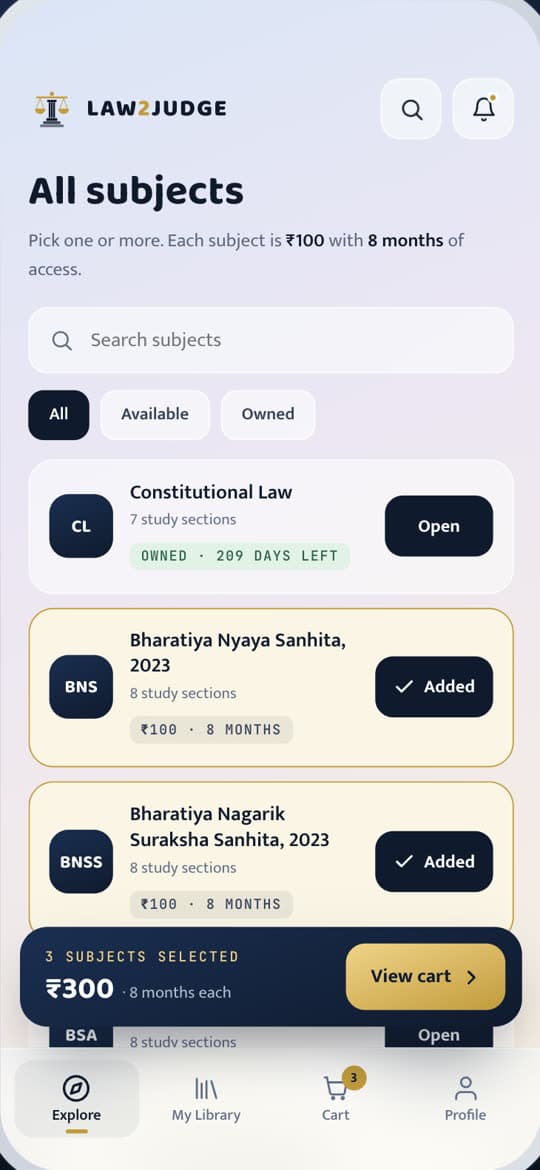
Law2Judge subject catalogue with per-subject pricing and cart
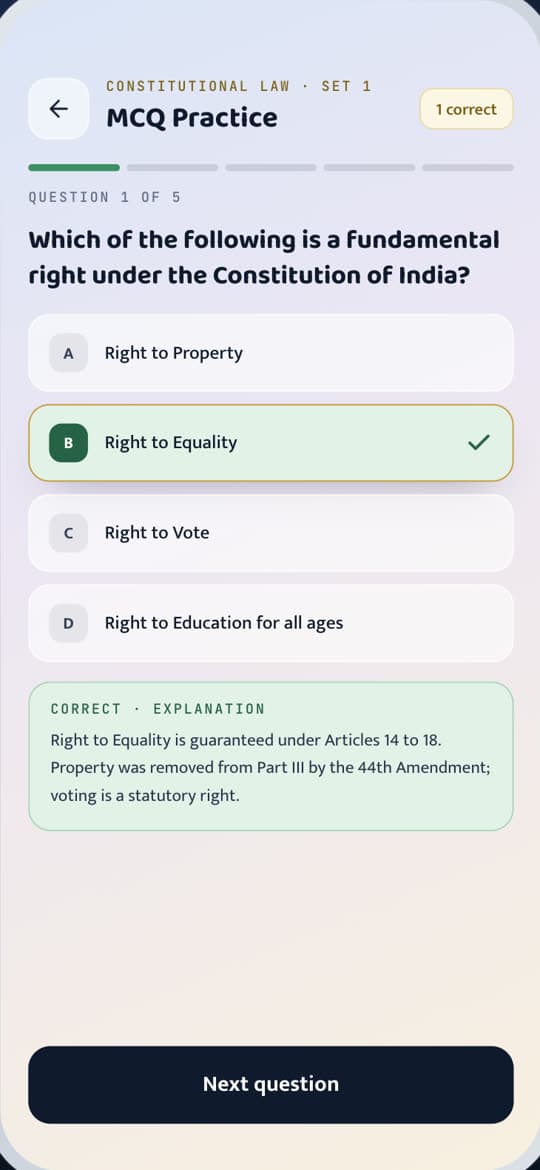
Law2Judge MCQ practice screen with answer explanation
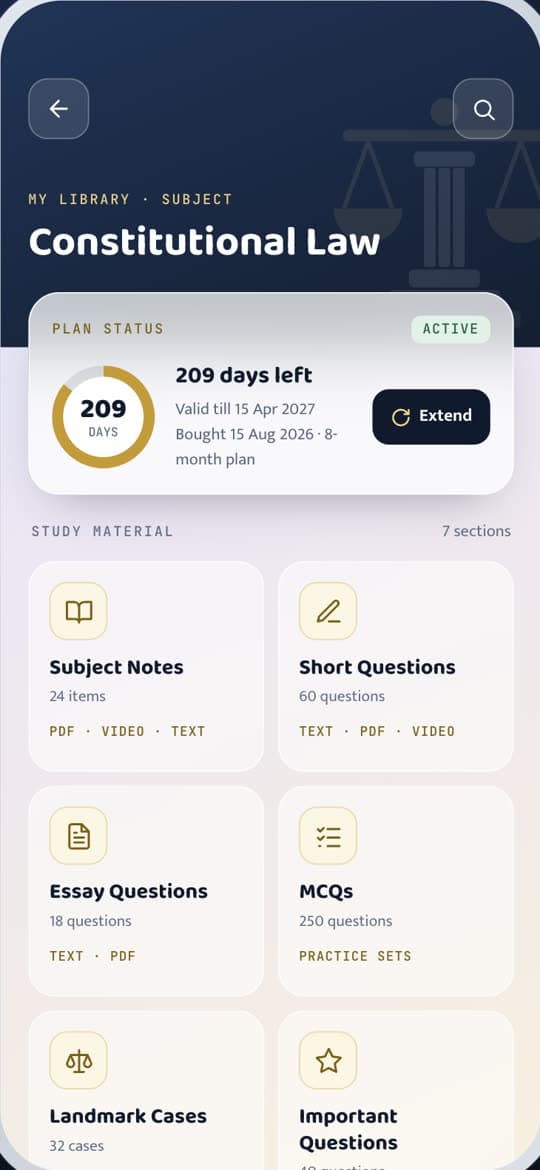
Law2Judge subject home with plan status and study sections

Legal-education app · LMS

Law2Judge

In development · store launch coming soon

A study app for Indian law students and judiciary aspirants. Subject-wise notes as PDF and video, MCQ practice with explanations, landmark cases, bare acts and past papers — bought per subject or as a bundle, with Razorpay checkout.

  • Per-subject purchases and bundles
  • PDF + video lessons
  • MCQ practice with explanations
  • Admin panel with Excel MCQ import

Expo React Native · Next.js admin · Express, TypeScript and MongoDB API

Illustrative mock-up of the Cadre Platform home screen and member card, with placeholder data.

Organisation & cadre management app

Cadre Platform

In client testing on Android

A members app for a Telangana political team. One OTP login that opens the right screens for each member's role, a news feed, events and emergency alerts sent to chosen mandals and towns, and push notifications that open the exact item — in Telugu, English and Hindi.

  • Role-based OTP login
  • Area-targeted events and alerts
  • Push notifications that deep-link
  • Telugu · English · Hindi

React Native (Android + iOS) · Firebase push · Express, TypeScript and PostgreSQL API

Web application · admin panel

Law2Judge Admin

In development

The web app the Law2Judge team runs the business from. Subjects, bundles and prices, PDF and video uploads, MCQs imported from an Excel template, orders and refunds, push notifications, and the app's legal pages edited with a live preview.

  • Catalogue and pricing
  • Excel MCQ import
  • Orders and refunds
  • Push notifications
  • Legal pages editor
  • Role-protected admin API

Next.js · TypeScript · Express API · MongoDB · Razorpay

Illustrative mock-up of the Law2Judge admin panel subjects screen.

Mobile App Development — frequently asked questions

How much does it cost to build a mobile app in India?

An MVP starts at ₹50,000 on the India price list and a full product with backend and integrations is ₹1,00,000. Beyond that it is quoted to scope. The number moves with screen count, how much backend the app needs, and how many external systems it has to integrate with.

Should I build for Android first or both?

Both, in almost every case, because React Native gives you both from one codebase for close to the cost of one. Android-only makes sense when your users are overwhelmingly on Android and you want the cheapest possible test of whether the idea works at all.

How long does an app take?

A focused MVP is typically 4–8 weeks. A full product with payments, notifications, an admin dashboard and several user roles runs 10–16 weeks and is delivered in stages.

Do you handle Play Store and App Store submission?

Yes — listing copy, screenshots, privacy declarations and the review process. Apple's review in particular has rules that are easier to satisfy in the build than to argue about after a rejection, so we design for them from the start.

What happens after launch?

Apps need maintenance whether or not you add features — OS updates, store policy changes and dependency security patches. There is a published care retainer (₹8,000 on the India list) for that, and it is optional. You own the code either way.

Can you build the website and the app together?

Yes, and it is usually cheaper than doing them separately because they share one API and one admin dashboard. See our web development page for the web half.

Get your app development estimate

Tell us what the app has to do and we will come back with a scope and a fixed number.

Best Mobile App Development Company in India To Ship a Working App Before You Guess Wrong Twice

The most expensive mistake in app development is building version three before anyone has used version one. Most quotes assume the opposite: a long feature list, priced as a single number, delivered whole at the end. By the time real users touch it, half the budget has gone into screens nobody asked for.

The other decision that gets made too casually is Android versus iOS versus both. Almost everything worth building today is React Native, which means a feature gets written once and shipped to both stores from a single codebase, roughly halving the build cost and, more usefully, halving the maintenance for the rest of the app's life.

Why an MVP-first app beats a feature-complete one

An app that does one thing well and gets into a real user's hands in weeks tells you something a feature list never can: whether people actually open it again. Cutting the scope to that one thing, and writing down what is deliberately deferred to version two, is most of the value of the first planning session.

What sits behind the screens

The interface is the part everyone notices, and it is not where most of the build effort goes.

  • Node.js APIs and a real database, with an admin dashboard so your team manages content and orders without calling a developer
  • Razorpay, PhonePe and UPI for payments, with the order flow and failure handling a checkout is useless without
  • Push notifications, segmented and scheduled, which is the retention mechanism most cheap apps skip
  • Location-aware features and image or document upload where the app needs them
  • Play Store and App Store submission, including the listing assets and the review process

What an app costs and why the range is wide

An MVP starts from the published India price for mobile app development, and a full product with backend and integrations sits at the second published tier. Beyond that it is quoted to scope. Screen count is one driver; how much backend logic sits behind the app is a bigger one, and how many outside systems it has to talk to is usually the biggest.

There is also a published care retainer for after launch, and it is optional. Apps need maintenance whether or not you add a single feature, because OS updates and store policy changes break things quietly if nobody is watching.

Android only, or both stores

Android-only makes sense in exactly one situation: you want the cheapest possible test of whether the idea works at all, and your users are overwhelmingly on Android already. Outside that case, building both from one React Native codebase costs close to the price of building one, so there is rarely a good reason to leave a store unlaunched.

Where this is the wrong spend

If a fast mobile website would serve the same customers just as well, an app is the expensive answer. An app earns its place once you have repeat customers worth notifying, a reason to want a home-screen icon, or a native capability a website genuinely cannot reach, such as certain background location or camera work. Building an app before that point usually produces a download nobody opens twice.

If the app is really a companion to a web platform you have not built yet, the honest order is web first. The mobile app talking to an API that does not exist yet is a common way projects stall in the middle.

Timeline, in weeks not promises

A focused MVP typically runs four to eight weeks. A full product with payments, notifications, an admin dashboard and several user roles runs ten to sixteen weeks and ships in stages, with an installable test build on your own phone every week rather than a single reveal at the end.

After the first version ships

The apps that keep earning their build cost are the ones where someone is watching what version two should actually be, based on what people did with version one rather than what the original brief guessed. That is also the point where the web and mobile sides usually get built together, sharing one API and one admin dashboard, which tends to be cheaper than doing them as two separate projects months apart.

Talk to us about mobile app development

Tell us what you are trying to build and where you are based. We call back within 2 hours during business hours.

By continuing you agree to be contacted by Mana Studio. We respect your privacy.