
An overhead desk split between a row of sticky notes joined by drawn arrows and an open laptop showing code
United States

Zapier vs Custom Automation

Where no-code automation genuinely wins, the four ceilings it hits, and the point at which per-task pricing costs more than owning the thing.

Not sure which is right for you?

Tell us the situation. We'll give you a straight answer, including when it's not us.

Your details stay private. We never sell or share them.

A real quote in 24 hours — not a sales sequence.

We'll tell you when we're wrong for youA price in writingYou own everythingNo lock-in contractsUSD invoicing24-hour reply

The short answer

The short version

If you're connecting two apps with a simple trigger and running a few hundred tasks a month, use Zapier. It's genuinely excellent at that and you don't need us. Move to custom when task pricing starts to sting at volume, when your logic needs more than a few branches, when a step needs real judgement rather than a rule, or when you need a database behind the process. Plenty of good setups are both — we frequently keep Zapier for the simple connections and build custom only where it breaks down.

Comparison last reviewed

Side by side

Where each one actually wins

A comparison where one column wins every row isn't a comparison. These are the trade-offs as we'd describe them on a call.

 Zapier / MakeNo-code automationCustom buildFrom $499
Time to first working automationAn afternoon, no developer neededAbout 2 weeks including process mapping
Upfront costNothing beyond the subscription$499 – $3,499
Cost at 50,000 tasks/monthTypically several hundred dollars a month, foreverServer and model costs only — usually a fraction of that
Complex branching logicPossible, but painful past a few branchesArbitrary complexity, and readable afterwards
Steps needing judgementLimited to what a rule can expressAI steps for reading, classifying and deciding
Working with a real databaseNot really its purposeFull database behind the process
Legacy systems with no modern APIUsually a dead endCustom connectors, file drops, direct DB access
Changing it yourself laterAnyone on your team can, immediatelySimple edits documented; structural changes need us
What you ownA configuration inside their platformThe code, the servers, the accounts — all yours

When Zapier is the better choice

We build custom automation and we still tell people to stay on Zapier regularly. It wins when:

  • You're connecting two or three apps with a straightforward trigger and action.
  • Volume is low — a few hundred tasks a month, where per-task pricing is trivial.
  • You want to change the automation yourself, this afternoon, without calling anyone.
  • You're still working out whether the process is worth automating at all.
  • The apps you use are all first-class Zapier integrations with no awkward edges.

In those cases no-code is the correct tool, not a compromise. Come back when the task bill gets uncomfortable or when you find yourself building a twelve-step Zap with filters inside filters.

Over three years

The comparison most people don't run

Month one is the wrong window. Here's what the two options cost once they've been running a while.

 Zapier / MakeCustom build
Year 1$800 – $4,000$1,499 + ~$600 usage
Year 2$800 – $4,000~$600 usage
Year 3$800 – $4,000~$600 usage
Three-year total$2,400 – $12,000About $1,499 + $1,800
What you own at the endNothingEvery workflow and account

Zapier figures assume a professional plan at moderate volume, which is where most businesses land once a few automations are running. Ours assumes the Business Automation tier plus model and hosting usage.

Practical steps

Moving off Zapier without breaking what works

The risk in migrating automation isn't technical, it's silence — a workflow that stops running and nobody notices for three weeks. This is how we avoid it.

  1. 1

    Inventory every live Zap, including the ones nobody remembers building.

  2. 2

    Rank them by business impact and task consumption — usually a small number account for most of the bill.

  3. 3

    Rebuild the expensive ones first and run both in parallel, comparing outputs.

  4. 4

    Cut over one workflow at a time, never all at once, with alerting on the new path.

  5. 5

    Keep Zapier for the simple connections where it's genuinely cheaper than maintaining custom code.

If you go our way

AI Automation — what it costs

Prices agreed in writing before anything starts.

Starter

Starter Automation

One high-volume process automated end to end — the one your team complains about most.

$499one-time
  • Free process audit before we quote
  • 1 workflow, start to finish
  • Connects up to 3 of your existing tools
  • AI step for classification or extraction
  • Failure alerts to email or Slack
  • Live in 2 weeks
  • 30 days of tuning after launch
Get this quoted
Business

Business Automation

A whole department's manual work removed — usually finance, ops or customer onboarding.

$1,499one-time
  • Up to 5 connected workflows
  • Unlimited tool connections
  • Custom AI steps trained on your documents
  • A dashboard showing what ran and what saved
  • Human approval gates where you want them
  • Live in 3–5 weeks
  • 60 days of tuning after launch
  • Team training session included
Get this quoted
Advanced

Custom Automation Suite

Company-wide automation with custom software behind it, for teams past what off-the-shelf tools can do.

$3,499from
  • Unlimited workflows across departments
  • Custom backend where no tool fits
  • Two-way sync with your CRM or ERP
  • Role-based access and full audit logging
  • Staged rollout, department by department
  • Timeline quoted after the audit
  • 90 days of support, then optional retainer
Get this quoted
Pay byWire / ACH transferCredit card (Stripe)PayPalZelleWise— invoiced in USD

Full ai automation details

Our Work

Real websites and apps we've shipped

Every one of these is live right now — click through and judge the work yourself.

AlgoEdge — built by Mana Studio
Algo Trading

AlgoEdge

Automated PNL reporting platform for Tradetron Creators — real-time MTM tracking, drawdown alerts, and Telegram summaries

Tradetron APITelegram Bot
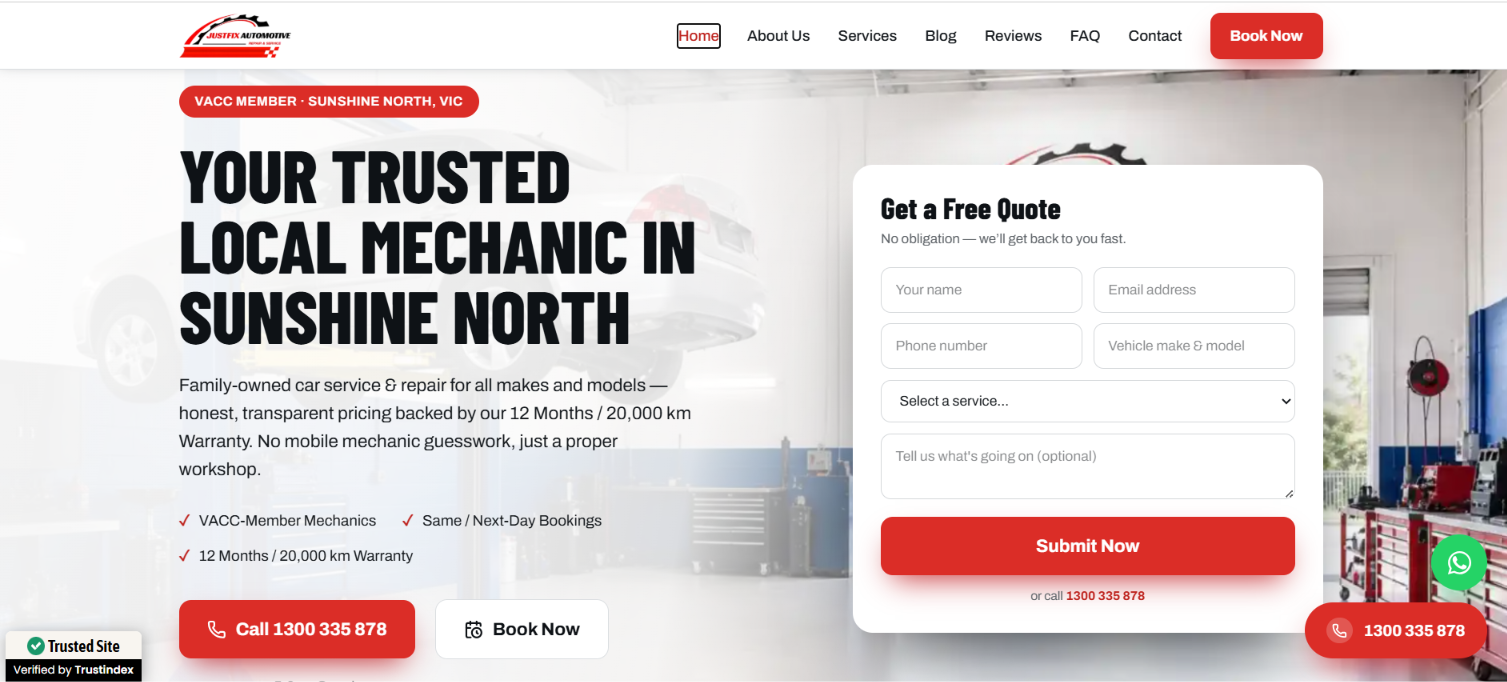
JustFix Automotive — built by Mana Studio
Car Service

JustFix Automotive

Designed and built a fast, user-friendly website for JustFix Automotive, a trusted mechanic workshop in Sunshine North, VIC. We executed a comprehensive on-page and technical SEO strategy optimizing site speed, local schema, and service-page architecture—to boost search rankings, capture high-intent local traffic, and drive online service bookings.

NEXT JSHOSTINGTAILWINDMONGODB
Dwaraka Packers & Movers – Sirisilla — built by Mana Studio
Logistics website

Dwaraka Packers & Movers – Sirisilla

After the successful launch of the first website, the client partnered with Mana Studio again to develop a dedicated website for their Sirisilla branch.

Next.jsReact.jsJavaScript (ES6+)HTML5
Dwaraka Packers and Movers — built by Mana Studio
logistics website

Dwaraka Packers and Movers

A modern, SEO-optimized website designed and developed by Mana Studio for a professional packers and movers company. From UI/UX design to full-stack development, we built a fast, mobile-friendly, and conversion-focused website that helps generate leads, build customer trust, and strengthen the brand's online presence.

Next.js React.js JavaScript (ES6+) HTML5 CSS3
Sri Laxmi Carz — built by Mana Studio
Automotive PWA

Sri Laxmi Carz

Pre-owned car dealership platform for a trusted dealer in Warangal — live inventory browsing, certified listings, and an installable PWA with offline access and instant new-arrival notifications

Next.jsPWASEOPush Notifications
Sarkari Job Samachar — built by Mana Studio
Job Portal

Sarkari Job Samachar

Comprehensive job portal for government job seekers with real-time updates and notifications

Next.jsAppwriteSEOContent Management

Why us

What you're actually buying

Not just the deliverable — the way the project runs.

Fixed scope, not an hourly meter

One number agreed before we start, quoted in USD against a written scope. No hourly billing, no change-order for work that was always in scope.

We work your hours

Daily overlap with US Eastern, Central and Pacific. Calls at 9am your time, not 9am ours.

Fluent English, direct access

You talk to the people building it — no account manager relay, no translation gap.

NDA signed before you share anything

Send yours or use ours, signed same-day at no cost. Your idea, code and data stay yours.

Prices in writing

A dated proposal with scope, milestones and the final number. No hourly meter.

You own everything, always

Code, designs, hosting, domains and logins handed over in full. Nothing is locked to us.

FAQ

Zapier vs Custom — your questions answered

At what point does Zapier get too expensive?+
It's less about a specific task count and more about the shape of your usage. The businesses that feel it are the ones running high-volume, low-value tasks — syncing every record rather than every important record. Work out your monthly task count and multiply by your plan's effective per-task rate; if that number is approaching the cost of a one-time build, you have your answer.
Can't I just use Make instead? It's cheaper.+
Often yes, and we'll say so. Make prices per operation rather than per task and is usually cheaper at volume, with better branching. If your problem is purely cost and your logic is still expressible in a visual builder, moving from Zapier to Make is a smaller, cheaper change than going custom. We have no stake in you choosing us over that.
Do you build on top of Zapier or replace it?+
Both, depending on what's actually wrong. If Zapier is doing the simple connections well, we leave it and build custom only for the steps that break. Replacing something that works is billable but not useful, and a hybrid setup is very often the correct answer.
What about reliability?+
Honestly, Zapier's uptime is good and better than a carelessly built custom system. The reliability advantage of custom isn't uptime, it's error handling — you control what happens when something fails, how it retries, and who gets told. On a no-code platform you largely get what the platform gives you.
How long does a custom build take compared to a Zap?+
A Zap takes an afternoon. A custom automation takes about two weeks for one process at $499, including mapping the process properly. That gap is real and it's why we don't recommend custom for things Zapier handles well — the speed of no-code is a genuine advantage, not a consolation prize.
What happens to my automations if I stop working with you?+
Nothing. Every workflow, server, API key and account is in your name and handed over. There's no platform fee to us and nothing stops running. That's the structural difference from renting a no-code subscription.
Free consultation

Still not sure which way to go?

Free 30-minute call. We'll tell you honestly which option fits — including when the answer isn't us.

Prefer to talk now? +91 86885 48048 — we call US numbers back same day.